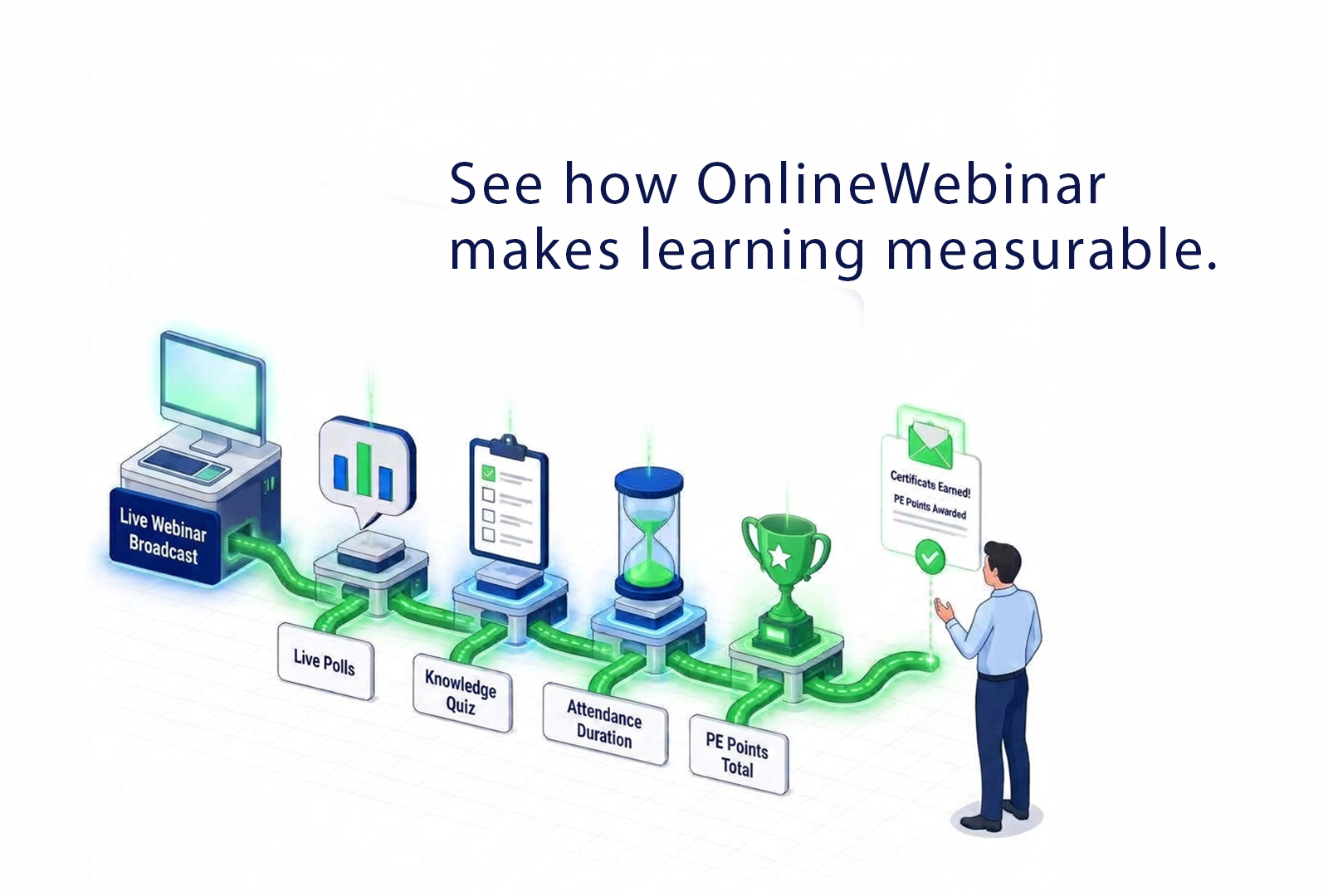
Webinars that make learning measurable
For training institutes and organisations with continuing-education requirements, a webinar needs to be more than a broadcast, it has to demonstrate that learning actually happened. OnlineWebinar combines assessment, attendance tracking, and a points system all in one environment.
Test what stuck, not just who attended
After a webinar ends, you can add a knowledge assessment built from survey questions, which is actually an additional test whose scores count toward the final result. Answers given during live polls count too. Actually all interaction during and after the webinar contributes to determining the knowledge level achieved.
That means you can see not just who took part, but whether the content actually landed. This is vital for any organisation that needs to demonstrate learning outcomes, not just log attendance.
Attendance you can back up with data
During the webinar, how long each attendee was actually online is tracked. For training and continuing-education contexts where demonstrable attendance matters, not just registration, but genuine participation over a set duration is essential. You're not relying on an assumption that someone watched; the data backs it up.
A points system for continuing education
For sectors with mandatory continuing education, for example healthcare, where professionals have structural points (PE) requirements, OnlineWebinar offers a points system aligned with continuing-education needs. Participation, assessment results, and attendance duration can jointly contribute to a participant's point total.
The results of this internal point system will be passed on either by email or via the API to the educational institute. The educator submits these points to the institute that registers these points nationally for the relevant sector. The participant also recieves notice via email when achieving the points.
What this means in practice
For training institutes and organisations with formal learning obligations, this means one environment where the webinar, the assessment, the attendance record, and the point tally come together.
In short:
- Post-webinar knowledge assessment via survey questions, with scores that count.
- Live poll answers count toward the knowledge level achieved
- Attendance duration is tracked during the webinar
- Points system for continuing education, relevant to sectors such as
healthcare
Learning that's demonstrable and measurable
Book a demo and we'll show how assessment, attendance tracking, and the
continuing-education points system work together within a webinar on
OnlineWebinar.
Features
You can use all of our features, even if you are trying out OnlineWebinar for free.
Platform & Access
Browser-based
Participants and presenters can join directly from their browser, no installation needed.
Mobile accessible
Works seamlessly on smartphones and tablets for both hosts and attendees.
Dutch- and English-speaking support
Local support and customer service available in Dutch and English.
Priority support
Fast, personal technical assistance for premium customers.
Webinar types
Live webinars
Host interactive, real-time sessions with chat, polls, and Q&A.
On-demand webinars
Replay successful webinars automatically and make them available anytime.
Content & Playback
Forward chat messages in on-demand
Keep chat context in the replay so viewers can follow the original discussion.
On-demand editor
Edit recorded webinars directly within the platform using our on-demand editor, no external tools required. Remove unwanted sections, move slides or even replace the entire video.
Video in waiting mode (pre-show)
Display a welcome screen or video before the broadcast begins.
Live transcriptionNew
Automatically transcribe your live broadcast. These subtitles will then be avaialable to your recorded stream.
Subtitles
Reach a wider audience by adding subtitle tracks in multiple languages to your recorded live stream or on-demand webinar.
Presentation & Interaction
Chat function
Enable real-time communication between attendees and hosts.
Q&A with moderation
Collect and filter questions for moderated live discussion.
Polls & quizzes
Engage your audience with live polls or interactive knowledge tests.
Exam
Test knowledge after a webinar and allow optional reattempts.
Shareholder meeting / voting
Upload a list of contacts with their assigned values and automatically apply weighted votes during your webinar. Ideal for shareholder meetings or any event where voting power must reflect participant roles or holdings.
Survey
Launch a survey after the webinar has ended to collect valuable feedback from your participants.
Slide controller
The slides can be changed using a separate slide controller, letting the host focus on the story.
Streaming & Technology
RTMP and SRT streaming
Stream professionally from external software (OBS, vMix, etc.) directly into the platform.
Streaming quality up to 8K
Enjoy crisp, broadcast-level video with minimal latency in HD, 4K or even up to 8K video.
Branding & Experience
Webinar overview (pre-login)
Display upcoming or available webinars before users log in.
Custom domain
Use your own domain for a fully branded experience.
White label option
Remove all OnlineWebinar branding for a completely private-label experience.
Private domain email
Send webinar related emails using your own private domain.
Marketing & Automation
Email invitations and reminders
Automate pre-event invitations and reminders to boost attendance.
Follow-up emails
Send automatic follow-up emails based on a combination of the time watched, poll and/or exam points or questions answered and survey questions answered.
Bulk email
Send bulk mail via a mail provider like Sendgrid.
API access
Full API capabilities for custom integrations and automations.
Analytics & Reporting
Live statistics
Monitor attendance, engagement, and interactions in real time.
Export participant data
Export detailed data on attendance, polls, and engagement metrics.
Security & Access control
Domain restriction
Allow participation only from approved domains.
Whitelisting
Allow only participants on a whitelist from registering and viewing your webinar.
Dedicated environment
Not shared infrastructure, but a dedicated environment per client. See what a dedicated webinar environment means for reliability, security and branding.
Container setup
Every white-label environment runs isolated, with its own database. See how OnlineWebinar combines brand control, data separation and scalability.
GDPR Compliance
100% EU hosting, a dedicated environment per client and a data processing agreement on request. See how OnlineWebinar meets GDPR requirements.