
How to get started broadcasting a webinar
Four hundred people are waiting. Your slides are open, your camera is on, and in ten seconds you'll be live. Are you ready?
Broadcasting a webinar will always be an exciting thing to do and getting ready is something we can all prepare for if done right. It’s a skill that becomes natural when you start doing it more. The key lies in knowing what to focus on and when.
The difference between a broadcast that feels polished and one that feels chaotic rarely comes down to budget or equipment. No instead, it comes down to preparation, the right roles, and knowing what to do when things don't go exactly to plan. Because with live broadcasts that is an ingredient that will always be there. We believe however that the right mindset is what can turn something unexpected into a feature rather than a problem.
And we want to add, in the time of Ai generated content, a live broadcast where something goes of script might just be the moment where your audience connects to your brand. Because in the end it is something every human being relates to.
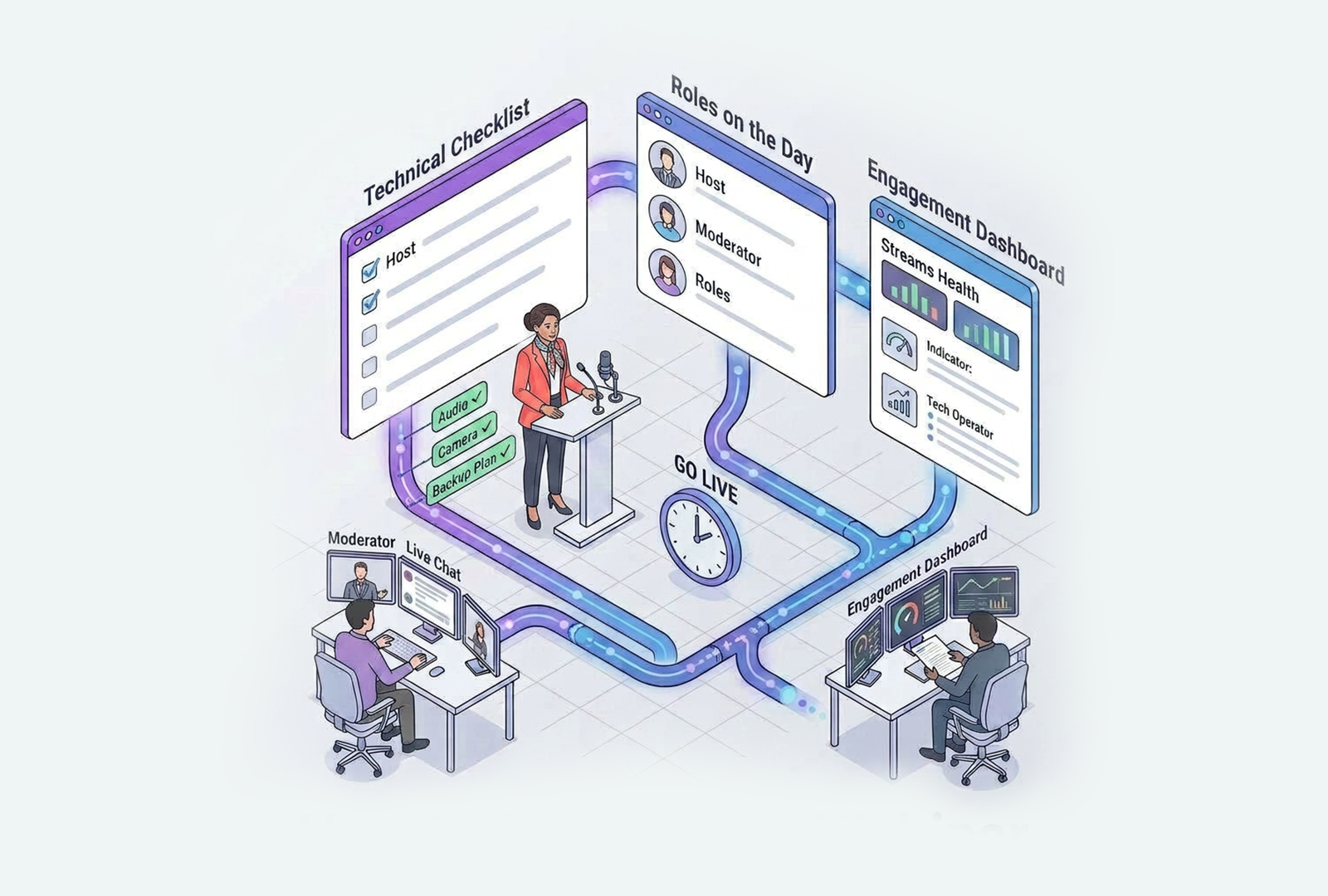
If you have already read our guide on organising a webinar, you have managed to do a big chunck of the work already! Then your goals should be clear, your content structured, and your audience is invited well in advance. Now it's time to shift your focus from what you're going to say to how you're going to deliver it live.
In this guide we walk you through everything that happens from the moment you open your broadcast setup to the moment you go off air. From your technical checklist and roles on the day, to managing live engagement and recovering gracefully if something goes wrong.
Because the best broadcasts aren't the ones where nothing goes wrong. They're the ones where the team was ready for anything.
Understand what broadcasting
actually means
There's an important mental shift from organising a webinar to broadcasting one. Until now, your focus has been on content, audience and preparation. The moment you go live, your focus becomes delivery, connection and control.
Broadcasting means you're no longer just a presenter. You're running a live production. Know that your audience can't see your notes, your nerves or your backup plan, but they can feel your energy, your confidence and whether you're in command of the room.
The shift is simpler than it sounds. Most of what makes a broadcast feel professional isn't expensive equipment or years of experience. It's knowing your role, having a clear plan for the hour ahead, and being prepared for the unexpected. That's exactly what this guide is for.
So let’s dive into it.
Your technical checklist
before going live
Technical problems during a live broadcast are almost always preventable. Most issues happen because something wasn't tested in advance, so a solid technical check sixty minutes before you go live eliminates most risks before they become problems.
Connection
Use a wired internet connection wherever possible. WiFi works until it doesn’t, and a dropped connection during a live event is one of the hardest things to recover from. If wired isn't an option, position yourself as close as possible to your router and make sure no one else on your network is streaming or downloading during your broadcast.
Camera
Position your camera at eye level. A camera looking up at you from a laptop on a desk creates an unflattering angle that undermines your authority without you realising it. A simple stack of books solves this immediately, but a tripod would be the best solution. You don't need an expensive camera to look professional because good lighting does far more for image quality than the camera itself.
Microphone
This will suprise some but audio quality is the single biggest factor in how professional your broadcast feels. Audiences forgive average video but not bad audio. If you're using your laptop's built-in microphone, consider a simple USB microphone is a significant upgrade for a rather small investment. Always record thirty seconds before your event and listen back. What sounds fine in the room often sounds very different through a microphone.
Lighting
Most of our clients will broadcast from either their own studio or a studio by one of our partners. Then light is not something you have to think about. But if you are in the situation where it needs to be setup remember that light should come from in front of you, not behind you. A lamp or ring light facing you creates clarity and presence. Natural light from a window is one of the most beautifulk sources of light, make sure it’s also coming from in front of you.
Environment
Close every application you're not using. Turn off notifications on all devices. Put your phone on silent and out of reach. Make sure people outside the studio or room where you are braodcasting are aware of the live webinar. These small steps remove all possible distractions that break your focus and your audience's trust in you.
Know your platform
before you go live
Ok this seems like a no-brainer but the worst moment to discover where the mute button is, is when you need it in front of four hundred people. Knowing your platform intimately before going live isn't optional, it's part of your preparation. Log in early, open your event, and walk through every function you plan to use. Advance your slides. Activate your polls. Test your screen share. Confirm your recording is enabled. With new clients we onboard we advice them to create a test webinar with with colleagues. This is a great way to get some confidence with both the hardware and the platfrom working together.
The best prep for your webinar is to do a full dry run with everyone who will be on screen or in a supporting role. Not a "does the audio work" test, a real run-through where you practice your opening, test the transitions between speakers, and confirm that your moderator can see the chat and Q&A clearly. This sounds intense preparation but it will bring your webinar to a next level and create more peace of mind during the live broadcast.
See it like this, under pressure people default to what's familiar. The more familiar your platform feels before you go live, the more natural and confident you'll appear when it matters.
Roles during a live broadcast
One of the most common mistakes in corporate webinars is asking one person to do more than one thing, to present confidently, to monitor the chat, to manage Q&A, to watch the clock and handle any technical issues that arise. That's not a presenter, that is four jobs in one. You will end up doing none of them done well.
Even in smaller teams, splitting responsibilities across roles transforms the quality of your broadcast.
The Presenter
This is the person that focuses entirely on delivery. The one who knows the content, manages energy, speaks to the audience. Should not be monitoring chat or managing anything technical during the broadcast.
The Moderator(s)
Moderators monitor the chat and Q&A in real time. He or she filters and formats questions for the presenter. The Moderator is the one who keeps the flow moving and acts as the bridge between the audience and the stage. In larger events, the moderator also appears on screen and adds a layer of professionalism that makes the broadcast feel like a produced show rather than a meeting.
The Technical Backstop
This role watches for technical issues, manages the platform, advances slides if needed, and is ready to act quickly if something goes wrong. In smaller broadcasts this role can be combined with moderation, but it should always be a named responsibility, not something everyone assumes someone else is handling.
Agree on a simple signal system before you go live. A private chat message between your moderator and presenter works well, something as simple as "2 minutes left" or "strong question coming" keeps everyone aligned without interrupting the broadcast.
Your broadcast environment
Your environment communicates before you say a single word. What your audience sees behind you, around you and on your screen tells them how seriously you take this moment. Think about what you want to communicate here.
For internal sessions and smaller broadcasts, a clean office setup with good lighting and a tidy background is entirely sufficient. Keep it professional but don't overthink it.
For high-stakes external broadcasts. Product launches, investor presentations, large client updates, thought leadership events, consider working with a studio partner. Partners like Crowdale or FabriQ Media provide multi-camera setups, professional lighting, speaker coaching, teleprompters, moderation full production support and strategy development. The result are broadcasts that feels like television. More importantly this brings a partner onboard that allow you to focus entirely on delivery rather than managing the technical side.
The rule of thumb is simple: match your environment to the weight of your message. If the content matters, the production should reflect that.
The first 60 seconds on air
Your first sixty seconds mean everything. Yes, this can make or break your webinar. The energy you bring into that opening moment tells your audience whether they are in good hands, and if they should stay.
Start with presence, not administration. Don't open with "can everyone hear me okay" or "we'll just wait a few more minutes for people to join." Open with intention by welcoming your audience, tell them exactly what they're about to get and also give them a reason to stay until the end.
Let’s look at a simple structure that works every time:
Welcome your audience → Name what they're getting today → Tell them how the session will run → Start your first content block
The whole thing should only take sixty seconds. If done well, this creates immediate trust and sets the tone for everything that follows. But if done poorly, it signals to your audience that the next forty-five minutes will feel the same way.
One more thing we want add here, smile before you go live. Not for performance, but this genuinely changes your vocal energy in a way your audience feels even if they can't see your face.
Managing the live flow
Now once you're on air, your job is to stay present while keeping the production moving. These two things can feel like they're pulling in opposite directions, but with the right rhythm, they rather reinforce each other.
Engagement every five to seven minutes
Very important, keep your audience active throughout the session. This doesn't require elaborate interactions, a quick poll, a question to the chat or just a moment to highlight an interesting comment. These micro-interactions serve two purposes: they reset attention and they give you real-time feedback on whether your audience is still with you. Data consistently shows that interactivity significantly reduces drop-off rates.
Let your moderator carry the chat
If you have a moderator, trust them. Your job is to present. Their job is to manage the room. Agree in advance on when questions will be addressed, how the moderator will flag priority questions, and what happens if the chat gets busy during a key moment.
Watch your energy, not just your content
The most common error in longer broadcasts is a gradual drop in energy that neither the presenter nor the audience consciously notices, until engagement falls off. A way to go about this is to treat each content block as its own moment. Re-enter each one with fresh energy, as if it's the opening of a new segment.
Keep time visible
Know your timings in advance and stick to them. An audience that was told the session runs forty-five minutes and is still listening at the one-hour mark feels their trust has been broken. Ending on time, or early, signals respect and professionalism.
When things go wrong
Things do go wrong every now and then. At some point in your broadcasting something will not go to plan. A connection drops for example or a slide won't advance. The broadcasts that recover well all have one thing in common: the team was ready for it.
Have a fallback plan and name it in advance
Before every broadcast, agree together on what happens if the presenter's connection drops, who takes over, what gets said, how long you wait before moving on. A plan that exists in theory but was never spoken out loud will not work under pressure.
Transparency builds trust, not panic
Now if something goes wrong on air, just say so calmly and immediately. "We're experiencing a brief technical issue, bear with us for just a moment." Your audience is far more forgiving than you might expect. What they don't forgive is silence, confusion, or pretending nothing is happening. A calm, honest acknowledgement keeps the room with you.
Keep going wherever you can
When audio drops for a few seconds, a slide takes a moment to load or a brief interruption, these are not crises. In situations like this just hold your composure and keep moving. Most audiences often don’t register small technical moments if the presenter handles them without panic.
Debrief every incident
After the broadcast, note what went wrong and why. Over time this builds a team that handles live production with real confidence, because you've already seen most of what can happen and you know how you responded.
Closing the broadcast
with Intention
How you end your broadcast is as important as your opening. A strong close leaves your audience with clarity, momentum and a clear next step. A weak close, trailing off, saying "I think that's everything”, wastes the goodwill you've built over the last hour.
Deliver your call to action before you say goodbye
What do you want your audience to do next? Do you want them to visit a page, download a resource, book a conversation or share the recording? Say it clearly, once, before you close. Don't bury it in the final slide or mention it as an afterthought.
Point them to on-demand
Tell your audience exactly where they can find the recording and when it will be available. With OnlineWebinar, every broadcast is automatically recorded and made available on-demand, let your audience know this. Many of your most valuable viewers will watch on their own schedule, and knowing the recording exists often keeps people engaged longer during the live session too.
Another way of reminding them is to send out an email with a link to the on-demand once it becomes available.
Thank your speakers and moderator on air
To acknowledgment your team live, takes fifteen seconds and signals to your audience and your team, that this was a professional well-run production.
End cleanly
Stop recording before closing the session. Confirm with your moderator that everything is wrapped up. This is the moment to step away from the broadcast mindset and give yourself a moment before jumping into the next thing. You just ran a live production. That deserves a breath.
See the potential for your webinars? Let’s talk!
Get your questions answered or request a tailored demo, we’ll show you what OnlineWebinar can do for you.